We're sad to see you go!
Before you make any final decisions, if you're having any issues with your account or need any help, reach out to us at support@mobilocard.com. We're confident we'll be able to address any concern you may be having.
We value your feedback as it allows us to keep improving our products and services. Trust us, it won't go unnoticed.
On this page
- Deleting my Mobilo Account
Deleting my Mobilo Account
If you still wish to deactivate your account, please follow these steps:
Through the website
-
Visit app.mobilocard.com and log in with your email address and password.
-
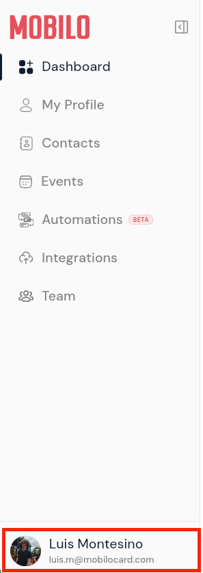
Click on your name in the lower right corner, and additional options will be displayed.
-
Hit Delete My Account.
-
Type the word "DELETE" as instructed on the screen.
-
Click the Delete my account button.

Through the app
-
Open the Mobilo Card app on your phone.
-
Log in using the email address your card is linked to and your password. If you don't have a password, you can use the Recover Password option.
-
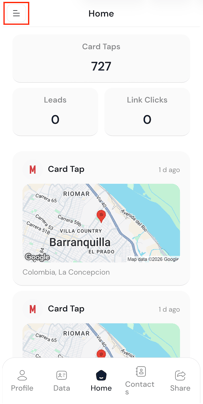
Click on the Menu icon located at the top left corner.
-
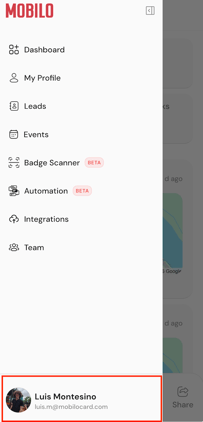
Click on your name in the lower left corner, and additional options will be displayed.
-
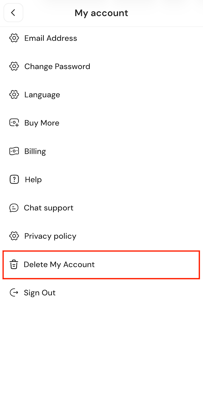
Click on Delete my account.
-
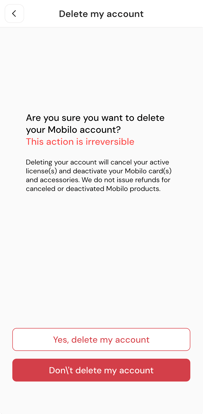
A new page will open, allowing you to confirm the deletion of your account.
Important
Mobilo profiles or accounts that have been deleted cannot be restored.
If you've accidentally deleted an account, one of our specialists can help you create a new one and add it to the appropriate team.
Any questions?
If you require assistance deleting your account, kindly contact us, and we will help you.
If you are already chatting with us, type in "Live Support" and you will be connected with one of our specialists, or contact us via email at support@mobilocard.com, and we can answer any questions you may have.