Adding a card to your wallet app is a simple process that can streamline the way you share your contact details. Here’s a step-by-step guide to help you add your digital card to your wallet app on both iOS and Android devices.
Through the Mobile App
Here are the steps to add the digital card to your virtual wallet through our mobile app.
-
Open the Mobilo app on your phone.
-
Tap on the Profile button that's on the bottom right corner of the screen, and hit Edit.
-
Hit Share. You may need to scroll through the tabs to see it.

-
You will see the Digital Business Card option, and you can tap on Generate.
-
Then, you will see a confirmation that an email is on its way.

-
Check your inbox. After a few minutes, you will receive an email from support@mobilocard.com with the instructions to add the card to your wallet. Please check your Spam or junk folders if you don't receive it in your main inbox.

-
Tap on the button for Apple Wallet or Google Wallet and add the card.
Through the Web App
Here are the steps to add the digital card to your virtual wallet through our website.
-
Go to app.mobilocard.com and log in.
-
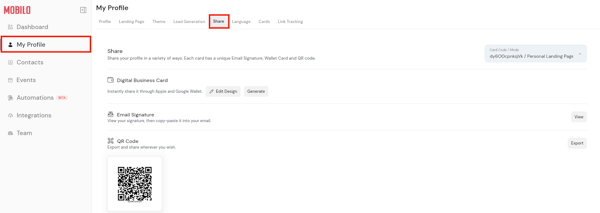
Go to My Profile on the left panel and click on Share.
-
Click on Generate next to "Digital Business Card".

-
Check your inbox. After a few minutes, you will receive an email from support@mobilocard.com with instructions to add the card to your wallet. Please check your Spam or junk folders if you don't receive it in your main inbox.

-
Tap on the icon for your Apple Wallet or Google Wallet and add the card.
And that's it! Now you can access your Wallet and share your contact information wherever you go.
Finally, here is what your digital business card will look like on your phone.

Any questions?
Kindly contact us, and we will be happy to help!
If you are already chatting with us, type "Live Support," and you will be connected with one of our specialists, or contact us via email at support@mobilocard.com, and we can answer any questions you may have.