Mobilo allows you to share your contact information via the app on your phone. Easily convert your contact details into a link to your landing page that you can share on your preferred messaging or social media apps.
Here’s how you do it!
-
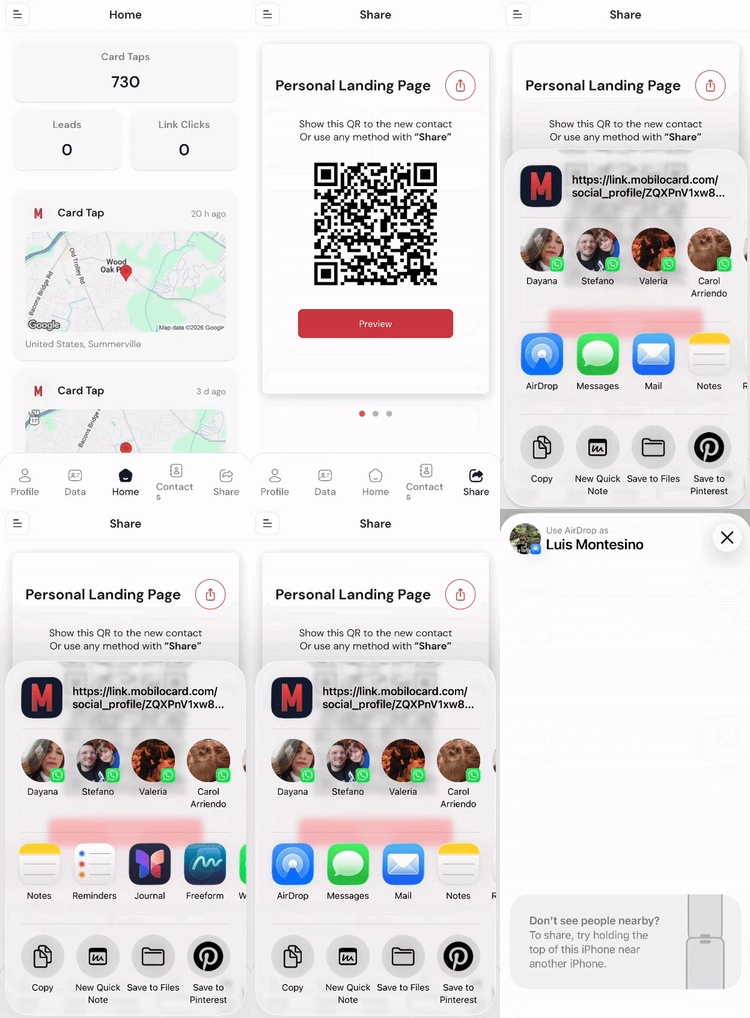
Go to the Mobilo app on your phone.
-
Tap the "Share" tab at the bottom right of the screen.
-
Select the mode you want to share (Landing Page, Lead Generation, Contact Details).
-
Click on the share icon at the top right.
-
Select the app you want to use to share your information. If you have an iPhone, you can even share the information via AirDrop with other iOS users.
Any questions?
Kindly contact us, and we will be happy to help!
If you are already chatting with us, type "Live Support," and you will be connected with one of our specialists, or contact us via email at support@mobilocard.com, and we can answer any questions you may have.